
Metilli – Unified Project Execution & Inventory Platform
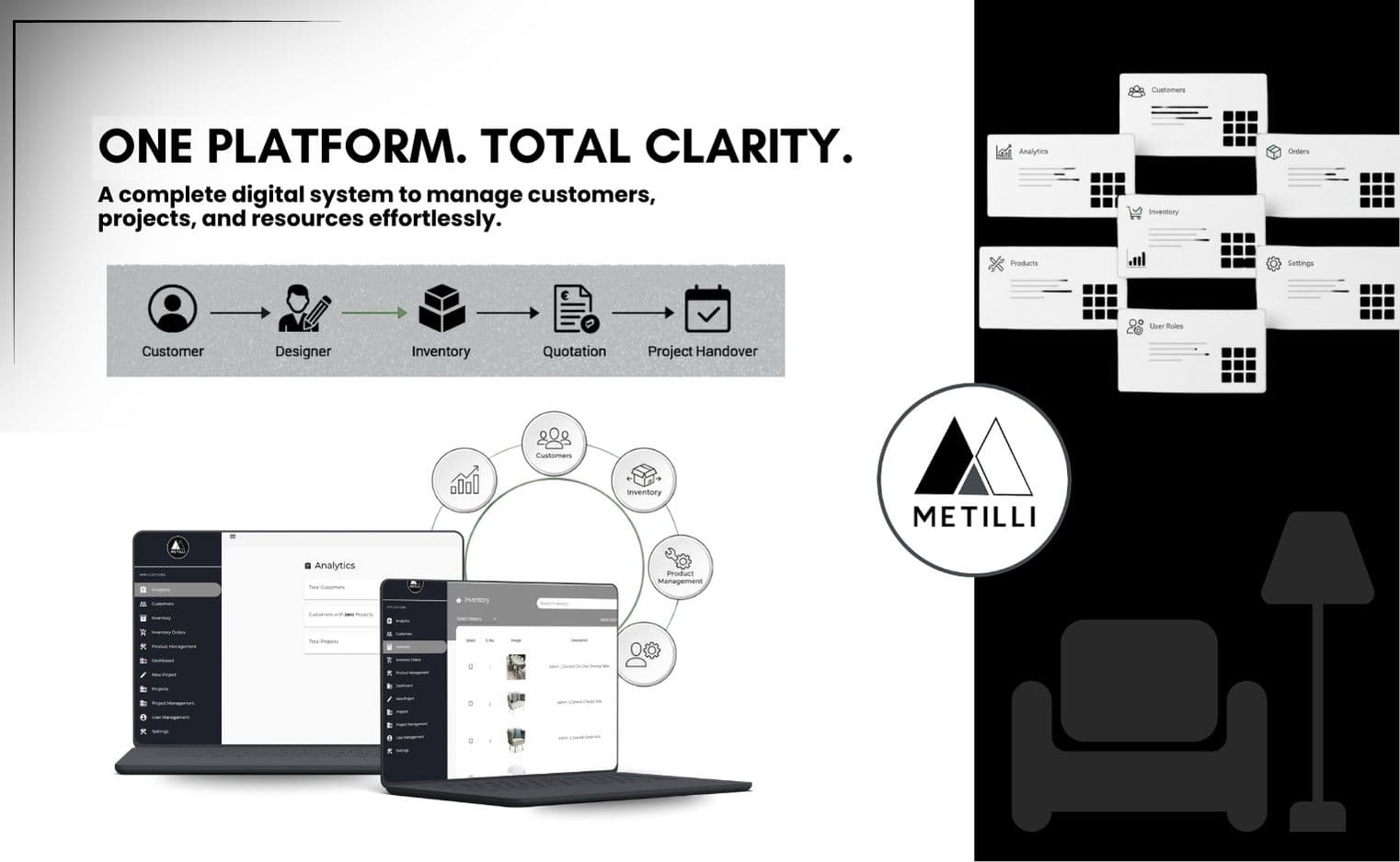
Metilli is an integrated platform designed to streamline project execution, automate operational checklists, and manage inventory with real-time accuracy. Built using Angular, Node.js, MongoDB, Redis, and AWS services, the system replaces scattered spreadsheets with a centralized workflow engine. Teams across project management, design, installation, and sales now work on a single synchronized dashboard that reflects live progress, stock status, and actionable insights. Metilli brings consistency, traceability, and efficiency to every stage of execution.
Client Name
Metilli (Internal Operations Platform)
Category
Web Application Development / Custom Enterprise Software
Objective
The core objective behind Metilli was to replace fragmented, offline, and error-prone operational processes with a single, intelligent platform that could support every workflow involved in large-scale installations. Project managers, designers, installers, agents, and sales teams previously worked using separate spreadsheets, informal checklists, and disjointed communication loops. This resulted in delays, inventory mismatches, and limited visibility for leadership. The platform needed to unify these processes, enforce standardized steps, map inventory consumption to project stages, deliver live progress dashboards, and offer robust analytics. Equally important was building a secure, role-based system that remained reliable even during peak operational load.
Challenges
1. Fragmented Workflows Across Multiple Teams
Before Metilli, every department operated in its own ecosystem. Project managers used spreadsheets, designers followed offline workflows, installers tracked tasks manually, and the sales team maintained separate files. This fragmentation caused duplicated efforts, inconsistent data, and increased communication gaps. There was no unified platform to monitor progress, track responsibilities, or validate completed steps. As a result, project timelines were often misaligned, and decision-makers lacked real-time clarity.
2. Lack of Standardized Pre- and Post-Installation Checklists
Installation and inspection checklists were inconsistent and varied from project to project. Teams often created their own formats, leading to missed steps, incomplete documentation, and quality validation errors. Without automated reminders or centralized task tracking, overdue activities went unnoticed. This directly impacted delivery timelines and made it difficult to audit project flow or identify bottlenecks.
3. Inventory Disconnected From Project Stages
Although an inventory system existed, it operated in isolation and didn’t align with project phases. This meant items were often purchased without clarity on exact project requirements, resulting in either shortages or excess stock. Store teams struggled to predict upcoming needs, and managers couldn't forecast material demand. Linking inventory movement to project timelines became a top priority.
4. Limited Visibility and No Real-Time Reporting
Leadership had no consolidated dashboard showing project health, resource allocation, or bottlenecks. Teams relied on manual updates, causing data inconsistencies and delays in reporting. Decision-makers lacked actionable insights, making it difficult to plan schedules, allocate workforce, or adjust timelines proactively.
5. Lack of a Scalable and Secure Architecture
As operations grew, the existing toolset became difficult to scale. Data was stored in scattered formats without access control or encryption. The new platform needed strong authentication, role-based permissions, secure data storage, and the ability to scale horizontally without performance loss. Ensuring uptime and reliability—especially during heavy data imports—was a major requirement.
6. Manual Migration and Data Cleaning Complexities
Migrating historical project data, inventory details, and user roles into a new structured system required careful planning. Duplicated entries, inconsistent naming formats, and mismatched identifiers made the migration process even more challenging. The platform needed automated seeding scripts, validation layers, and error detection mechanisms to ensure data integrity.
Our Big Idea
The vision was to build a unified operational cockpit that would act as the single source of truth for every team involved in project execution. Instead of forcing departments to adapt to generic tools, the platform was designed after comprehensive interviews with project managers, store leads, finance teams, and install crews. The idea was to digitize their workflows, not disrupt them. By designing modular API routes, standardized entity structures, checklist templates, and inventory mappings tied to project phases, Metilli became a central hub where every action—whether a task update, checklist completion, stock request, or approval—was automatically synchronized across the system. This ensured visibility, accountability, and alignment at every stage. The platform was built to scale, secure enough for multi-role use, and intuitive for teams with varied levels of technical familiarity.
What We Did
1. Built a Robust API Architecture Using Node.js & Express
A clustered Node.js environment was designed to handle concurrent operations efficiently. The API included health checks, environment-based auto-scaling logic, and cron-driven jobs. Modular controllers, validators, and middleware ensured consistent behavior across all routes. This made the system reliable, secure, and easy to maintain.
2. Designed a Scalable MongoDB Schema for Projects, Inventory & Workflows
MongoDB was used to structure core entities such as projects, customers, terms, sections, tasks, checklists, inventory categories, brands, and orders. Indexing improved performance for large datasets, and validation rules ensured clean, predictable data. This schema became the backbone of every workflow inside Metilli.
3. Implemented Role-Based Authentication & Access Control
A JWT-based authentication module allowed secure login with user-specific permissions. Roles included admin, manager, designer, sales, installer, and agent. Every route was protected with access gates to ensure data confidentiality and prevent unauthorized updates. Users viewed only the modules relevant to their responsibilities.
4. Automated Pre- and Post-Installation Checklists
Standardized checklist templates replaced manual documents. Each checklist generated task logs, timestamps, and status updates, ensuring proper execution. Automated cron reminders were implemented to flag overdue tasks, helping managers take timely action and improving process adherence.
5. Developed an Inventory Management Suite Connected to Project Phases
The inventory system included categories, subcategories, tags, and order flows. Hardware and appliances could be assigned to upcoming project phases, enabling accurate forecasting. The system tracked usage, shortages, and reorder requirements, ensuring teams always had clarity on stock availability.
6. Delivered Real-Time Dashboards & Analytics for Leadership
Aggregated analytics modules were built to display throughput, project speed, bottlenecks, task delays, and resource utilization. These insights empowered leadership to make data-driven decisions and plan more effectively. Executives could now track operations at a glance.
7. Built a Clean, Modular Angular Frontend
The Angular SPA mirrored the backend architecture through neatly separated modules—projects, checklists, inventory, analytics. The frontend offered dynamic filters, tables, detail views, and forms built with UX clarity in mind. Reactive programming with RxJS ensured smooth data flow between components.
8. Ensured Reliability & Healthy Deployment Practices
A /health endpoint was added to expose API uptime, worker readiness, and DB status. Cluster restart logic prevented downtime during crashes. Environment variables were managed through secure .env files. Dockerized containers enabled consistent deployment across testing and production.
9. Completed Migration, QA & UAT With Precision
Postman test suites covered critical flows including authentication, project creation, inventory updates, and role-based actions. UAT cycles with internal teams ensured the platform functioned exactly as needed. Migration scripts imported historical data and validated roles, ensuring a smooth transition.
Results
1. Unified Operations Across All Departments
Teams that once operated separately now share a centralized, synchronized workspace. Everyone—from designers to installers—works with the same data, reducing confusion and improving collaboration.
2. Faster Project Turnaround Times
Automated checklists and timely reminders eliminated delays caused by missing documents or incomplete tasks. Projects moved through their stages faster, with improved quality control.
3. Inventory Accuracy Improved Significantly
Linking stock movement to project phases eliminated guesswork. Store teams could forecast needs more accurately, reducing both shortages and wastage.
4. Improved Transparency and Analytics for Decision-Makers
Leadership gained real-time clarity on project progress, workload distribution, and workflow bottlenecks. Better insights led to more informed planning and scheduling decisions.
5. High Reliability With Scalable Infrastructure
Clustering, caching, monitoring, and Docker deployments ensured stability even during large imports or peak usage. The platform maintained excellent uptime and responsiveness.
6. Enhanced Security Through RBAC & Enforced Permissions
Role-based access minimized operational risks. Sensitive actions were limited to authorized users, and data visibility was tightly controlled across modules.
Takeaways
1. Domain Understanding Drives the Best Architecture
The platform’s success came from deeply understanding the operational workflows through interviews with multiple departments before writing a single API endpoint.
2. Standardization Creates Predictability
Checklist templates, consistent route structures, and clear user permissions brought structure and predictability to previously inconsistent processes.
3. Inventory Visibility Is a Game-Changer
Mapping inventory directly to project phases allowed better forecasting, better purchasing decisions, and more efficient planning.
4. Modular Design Ensures Scalability
Both the backend and frontend were built with modular architecture, making the platform flexible for future growth and feature expansion.
5. Real-Time Data Improves Efficiency
Teams now act faster because the system provides immediate status updates, reminders, and alerts — something impossible with previous manual workflows.
Conclusion
Metilli successfully transformed everyday operations into a streamlined, automated, and intelligently connected system. By centralizing project execution, enforcing structured workflows, aligning inventory with real requirements, and delivering real-time insights, the platform strengthened overall operational efficiency. If you're looking to digitize complex workflows and build a scalable operational system tailored to your needs, our team can help bring your vision to life with precision and reliability.
Ready to build your own intelligent operations platform? Let’s create a system that drives efficiency, clarity, and long-term growth.